
This page is about configuring the OpenSSH server. For Tectia SSH, see Tectia SSH Server Administrator Manual. For configuring public key authentication, see ssh-keygen. For configuring authorized keys for public key authentication, see authorized_keys.
The OpenSSH server reads a configuration file when it is started. Usually, this file is /etc/ssh/sshd_config, but the location can be changed using the -f command line option when starting sshd. Some organizations run multiple SSH servers at different port numbers, specifying a different configuration file for each server using this option.
The default values for certain configuration options in OpenSSH are quite restrictive and often need to be changed. Usually this is done by editing the default configuration file to change just a few options.
Contents
Relationship of configuration files Common configuration options for individual use Common configuration changes for the enterprise Cryptographic policy Verbose logging AuthorizedKeysFile location Root login Login banner Port forwarding Certificate-based authentication Detailedsshd_config file format
Relationship of configuration files
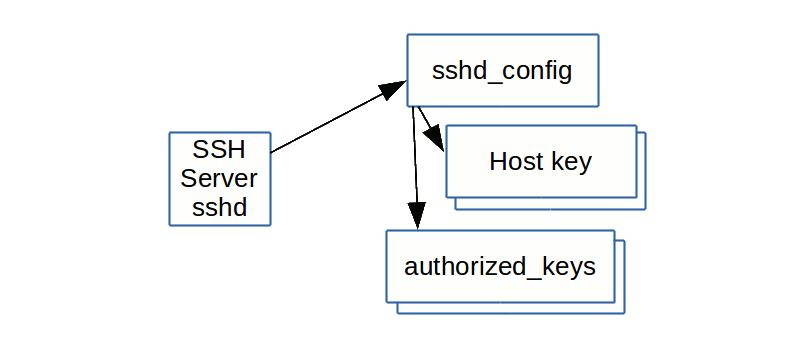
The SSH server actually reads several configuration files. The sshd_config file specifies the locations of one or more host key files (mandatory) and the location of authorized_keys files for users. It may also refer to a number of other files.
Common configuration options for individual use
Many individual developers and power users wish to maximize their convenience rather than go for maximum security. For such use, we recommend the following settings for homes, development servers, and universities. For important systems even such organizations should follow the guidelines for configuring enterprise servers.
X11Forwarding yes AllowAgentForwarding yes PermitRootLogin yesCommon configuration changes for the enterprise
Larger enterprises, or others wanting to run a tight security policy for certain servers, may want to configure the following configuration options.
Cryptographic policy
Symmetric algorithms for encrypting the bulk of transferred data are configured using the Ciphers option. A good value is aes128-ctr,aes192-ctr,aes256-ctr. This should also provide good interoperability.
Host key algorithms are selected by the HostKeyAlgorithms option. A good value is ecdsa-sha2-nistp256,ecdsa-sha2-nistp384,ecdsa-sha2-nistp521,ssh-rsa,ss/ssh/sshd_config/h-dss.
Key exchange algorithms are selected by the KexAlgorithms option. We recommend ecdh-sha2-nistp256,ecdh-sha2-nistp384,ecdh-sha2-nistp521,diffie-hellman-group14-sha1,diffie-hellman-group-exchange-sha256. In particular, we do not recommend allowing diffie-hellman-group1-sha1, unless needed for compatibility. It uses a 768 bit prime number, which is too small by today's standards and may be breakable by intelligence agencies in real time. Using it could expose connections to man-in-the-middle attacks when faced with such adversaries.
Message authentication code algorithms are configured using the MACs option. A good value is hmac-sha2-256,hmac-sha2-512,hmac-sha1.
We have included the sha-1 algorithm in the above sets only for compatibility. Its use is questionable from a security perspective. If it is not needed for compatibility, we recommend disabling it. NIST has also issued guidance on it.
Ciphers aes128-ctr,aes192-ctr,aes256-ctrHostKeyAlgorithms ecdsa-sha2-nistp256,ecdsa-sha2-nistp384,ecdsa-sha2-nistp521,ssh-rsa,ssh-dssKexAlgorithms ecdh-sha2-nistp256,ecdh-sha2-nistp384,ecdh-sha2-nistp521,diffie-hellman-group14-sha1,diffie-hellman-group-exchange-sha256MACs hmac-sha2-256,hmac-sha2-512,hmac-sha1Some organizations may also want to set policy for PubkeyAcceptedKeyTypes. Same value as for HostKeyAlgorithms would make sense. However, restricting this value could abruptly break business-critical connections, and we recommend only setting it after analyzing all existing authorized keys for the algorithms they use.
Verbose logging
It is strongly recommended that LogLevel be set to VERBOSE. This way, the key fingerprint for any SSH key used for login is logged. This information is important for SSH key management, especially in legacy environments.
LogLevel VERBOSENote: the newer OpenSSH releases do not need a verbose mode setting anymore as the required SSH key activity information is written into the syslog by the default OpenSSH config.
AuthorizedKeysFile location
Historically, most organizations have not touched the location of the authorized keys files. This means they are in each user's home directory, and each user can configure additional permanent credentials for themselves and their friends. They can also add additional permanent credentials for any service account or root account they are able to log into. This has lead to massive problems in large organizations around managing SSH keys.
We strongly recommend that organizations establish proper life cycle management for key-based credentials, and set the related options as part of this process. See SSH key management and contact us for additional help.
AuthorizedKeysFile /etc/ssh/authorized-keys/%uEnterprises should also pay attention to the AuthorizedKeysCommand and AuthorizedKeysCommandUser options. They are typically used when SELinux is enabled and to fetch SSH keys from LDAP directories or other data sources. Their use can make auditing SSH keys cumbersome and they can be used to hide backdoor keys from casual observation.
Root login
For enterprise use, root access should generally go through a privileged access management system. This is necessary to enable auditing. A privilege escalation method such as sudo may then be used to execute commands as root. Ideally, the root account will not have any password at all. (See also PrivX for eliminating all admin account passwords.)
However, many organizations need to allow scripts to run commands as root using SSH keys. With proper SSH key lifecycle management, this is the recommended way to script access. We furthermore recommend setting a forced command for any key configured to allow access as root. This can be enforced using the configuration file.
To disable passwords for root, but still allow key-based access without forced command, use:
PermitRootLogin prohibit-passwordTo disable passwords and only allow key-based access with a forced command, use:
PermitRootLogin forced-commands-onlyWe also need to point out that we have seen some organizations use forced commands that in practice allow the client to run any command, just to nominally satisfy a policy/audit requirement that all keys must have forced commands. Forced commands must be EFFECTIVE. In general, the forced command should make no reference to the SSH_ORIGINAL_COMMAND environment-variable. Auditors should check for this; if the forced command does reference this, odds are 99% that the forced command has been intentionally designed to fool auditors.
Login banner
Many enterprises, especially in the government, may want to print a login banner with legal warnings before asking for a password. The Banner option does this. If this option is specified, the contents of the file will be printed to the client before login.
Banner /etc/bannerPort forwarding
Enterprises would generally want to prevent port forwarding on their servers, unless expressly needed for tunneling legacy applications. There is substantial risk that users will use SSH tunneling to open backdoors into the organization through the firewall to get access to work machines from home. We've seen this done in numerous organizations and the technique is widely known.
Even if port forwarding is disabled, there is still the possibility of a user running their own SSH server or having their own laptop run one.
AllowTcpForwarding no AllowStreamLocalForwarding no GatewayPorts no PermitTunnel noCertificate-based authentication
OpenSSH also supports its own certificate formats for host and user authentication. See PrivX Zero Trust Access Management Solution for how to use these for privileged access without passwords and automated access without SSH keys, based on Active Directory roles.
In host authentication, host certificates can be a major convenience. Tectia SSH supports standards-based X.509 certificates for this. OpenSSH requires its own certificate authority and secure certification authorities for it are not yet commercially available as of this writing. Therefore we don't recommend using OpenSSH certificates quite yet.
See OpenSSH certificates for more information on OpenSSH certificates and how to configure them and what is available for issuing them.
 Detailed
 sshd_config file format
The sshd_config file is an ASCII text based file where the different configuration options of the SSH server are indicated and configured with keyword/argument pairs. Arguments that contain spaces are to be enclosed in double quotes (").
In the sshd_config file the keywords are case-insensitive while arguments are case-sensitive.
Each line that starts with '#' is interpreted as a comment.
The following is a list of some of the most commonly used sshd_config keywords. Full listing of all available configuration options can be found on the sshd Config Manual Pages.
AcceptEnv
Specifies which environment variables sent by the client will be copied to the session's user environment.
AddressFamily
Specifies which IP address family sshd should use. Valid arguments are: any, inet (IPv4 only), inet6 (IPv6 only).
AllowAgentForwarding
Specifies whether ssh-agent forwarding is permitted. The default is yes.
AllowStreamLocalForwarding
Specifies whether forwarding Unix domain sockets is permitted. The default is yes.
AllowTcpForwarding
Specifies whether TCP forwarding is permitted. The default is yes.
AllowUsers
Specifies that login is allowed only for those user names that match a pattern listed with this keyword. By default, login is allowed for all user names.
AuthenticationMethods
Specifies the authentication methods that must be successfully completed in order to grant access to a user.
AuthorizedKeysFile
Specifies the file containing the public keys that can be used for user authentication. For more information, see Configuring Authorized Keys for OpenSSH.
ChallengeResponseAuthentication Specifies whether challenge-response authentication is allowed. The default is yes.
ChrootDirectory
Specifies the pathname of a directory to chroot (change root directory) to after authentication.
Ciphers
Specified the ciphers allowed. The ciphers supported in OpenSSH 7.3 are: 3des-cbc, aes128-cbc, aes192-cbc, aes256-cbc, aes128-ctr, aes192-ctr, aes256-ctr, aes128-gcm@openssh.com, aes256-gcm@openssh.com, arcfour, arcfour128, arcfour256, blowfish-cbc, cast128-cbc, chacha20-poly1305@openssh.com.
Compression
Specifies whether compression is allowed (yes), denied (no) or delayed until the user has authenticated successfully (delayed - default).
DenyUsers
Specifies that login is denied for those user names that match a pattern listed with this keyword. By default, login is allowed for all user names.
ForceCommand
Forces the execution of the command specified by this keyword, ignoring any command supplied by the client and ~/.ssh/rc if present.
GatewayPorts
Specifies whether remote hosts are allowed to connect to ports forwarded for the client. The default is no.
GSSAPIAuthentication
Specifies whether user authentication based on GSSAPI is allowed. The default is no.
HostbasedAuthentication
Specifies whether rhosts or /etc/hosts.equiv authentication together with successful public key client host authentication (i.e. using the public key of the client machine to authenticate a user to the remote server, providing a non-interactive form of authentication) is allowed. The default is no.
HostbasedUsesNameFromPacketOnly
Specifies whether or not the server will attempt to perform a reverse name lookup when matching the name in the ~/.shosts, ~/.rhosts, and /etc/hosts.equiv files during host-based authentication.
HostKey
Specifies a file containing a private host key used by SSH. It is possible to have multiple host key files. The default is /etc/ssh/ssh_host_dsa_key, /etc/ssh/ssh_host_ecdsa_key, /etc/ssh/ssh_host_ed25519_key and /etc/ssh/ssh_host_rsa_key for SSH protocol version 2.
HostKeyAlgorithms
Specifies the host key algorithms offered by the server. The defaults (OpenSSH 7.3) are: ecdsa-sha2-nistp256-cert-v01@openssh.com, ecdsa-sha2-nistp384-cert-v01@openssh.com, ecdsa-sha2-nistp521-cert-v01@openssh.com, ssh-ed25519-cert-v01@openssh.com, ssh-rsa-cert-v01@openssh.com, ssh-dss-cert-v01@openssh.com, ecdsa-sha2-nistp256,ecdsa-sha2-nistp384, ecdsa-sha2-nistp521,ssh-ed25519, ssh-rsa,ssh-dss.
IgnoreRhosts
Specifies that .rhosts and .shosts files will not be used in RhostsRSAAuthentication or HostbasedAuthentication.
KbdInteractiveAuthentication
Specified whether keyboard-interactive authentication is allowed. By default, the value of ChallengeResponseAuthenticationis used.
KexAlgorithms
Specifies the available Key Exchange algorithms. The KEX algorithms supported in OpenSSH 7.3 are: curve25519-sha256@libssh.org, diffie-hellman-group1-sha1, diffie-hellman-group14-sha1, diffie-hellman-group-exchange-sha1, diffie-hellman-group-exchange-sha256, ecdh-sha2-nistp256, ecdh-sha2-nistp384, ecdh-sha2-nistp521.
ListenAddress
Specifies the local addresses sshd should listen on. The following forms are allowed:
ListenAddress host|IPv4_addr|IPv6_addr
ListenAddress host|IPv4_addr:port
ListenAddress [host|IPv6_addr]:port
LoginGraceTime
The time after which the server disconnects if the user has not successfully logged in.
LogLevel
Specifies the level of verbosity for logging messages from sshd.
MACs
Specifies the available message authentication code algorithms that are used for protecting data integrity. The MACs supported in OpenSSH 7.3 are: hmac-md5, hmac-md5-96, hmac-ripemd160, hmac-sha1, hmac-sha1-96, hmac-sha2-256, hmac-sha2-512, umac-64@openssh.com, umac-128@openssh.com, hmac-md5-etm@openssh.com, hmac-md5-96-etm@openssh.com, hmac-ripemd160-etm@openssh.com, hmac-sha1-etm@openssh.com, hmac-sha1-96-etm@openssh.com, hmac-sha2-256-etm@openssh.com, hmac-sha2-512-etm@openssh.com, umac-64-etm@openssh.com, umac-128-etm@openssh.com.
In the algorithm names, -etm means "encrypt-then-mac", i.e. the message authentication code is calculated after encryption. It is recommended to use these algorithms because they are considered safer.
Match
PasswordAuthentication
PermitEmptyPasswords
PermitOpen
PermitRootLogin
PermitTTY
PermitTunnel
PermitUserEnvironment
PermitUserRC
Port
PubkeyAuthentication
Subsystem
UseDNS
UsePrivilegeSeparation
X11Forwarding
X11UseLocalhost
The detailed configuration file format documentation is still work in progress...
