


Skip to content

A Marine Vessel Operator Secures Remote Access for  1000s of ships

Secures diagnostics, maintenance and upgrade operations.

Create an image of a container ship sailing on the sea carrying cargo

Customer

The customer is a global shipping company with a current fleet of over 1000 ships and expanding. Since the fleet is travelling on the seas all over the world, the customer wants to stay up-to-date on the operational capability of the fleet and to pre-empt any potential problems by running regular diagnostics, remote maintenance and troubleshooting on the ships.

Customer's security and operational concerns

Forcing the ships to dock at a port for checkups and diagnostics is costly and slows down the delivery times of goods. This is why the customer had deployed a CentOS server infrastructure with applications and remote diagnostics and maintenance tools that collect data from IoT sensors.

The maintenance engineers access the ships from an AWS cloud. The customer soon realized that this mission-critical access from the public cloud environment came with risks, including:

Disruption of critical systems, including cyberattacks on Automatic Identification System (AIS,) Electronic Chart Display and Information System (ECDIS), and Global Maritime Distress and Safety System, (GMDSS). These are critical navigation and communication systems, which – if hacked – could potentially leave ships unguided, lost at sea and without communication capabilities.

Safety and security concerns: A compromised system can cause physical damage if safety mechanisms are turned off remotely, putting the safety of the crew at jeopardy.

Third-party access: Remote diagnostics are often done by various vendor experts accessing the ship systems. Limited tracking, visibility and security might expose entry points for cyber threats.

placeholder-1

Customer challenge: VPN limitations

To remedy, the customer tried using a VPN for remote diagnostic but soon encountered the following challenges:

Limited transparency into remote access without visibility into the sessions. The VPN connections to the ship networks were always on.

Indiscriminate access to all areas once logged in to the VPN service. Untracked and unidentified connections to the ship subsystems.

Shared accounts and manually managed access credentials. Scalability, connectivity and performance issues.

PrivX OT deployment in the customer environment

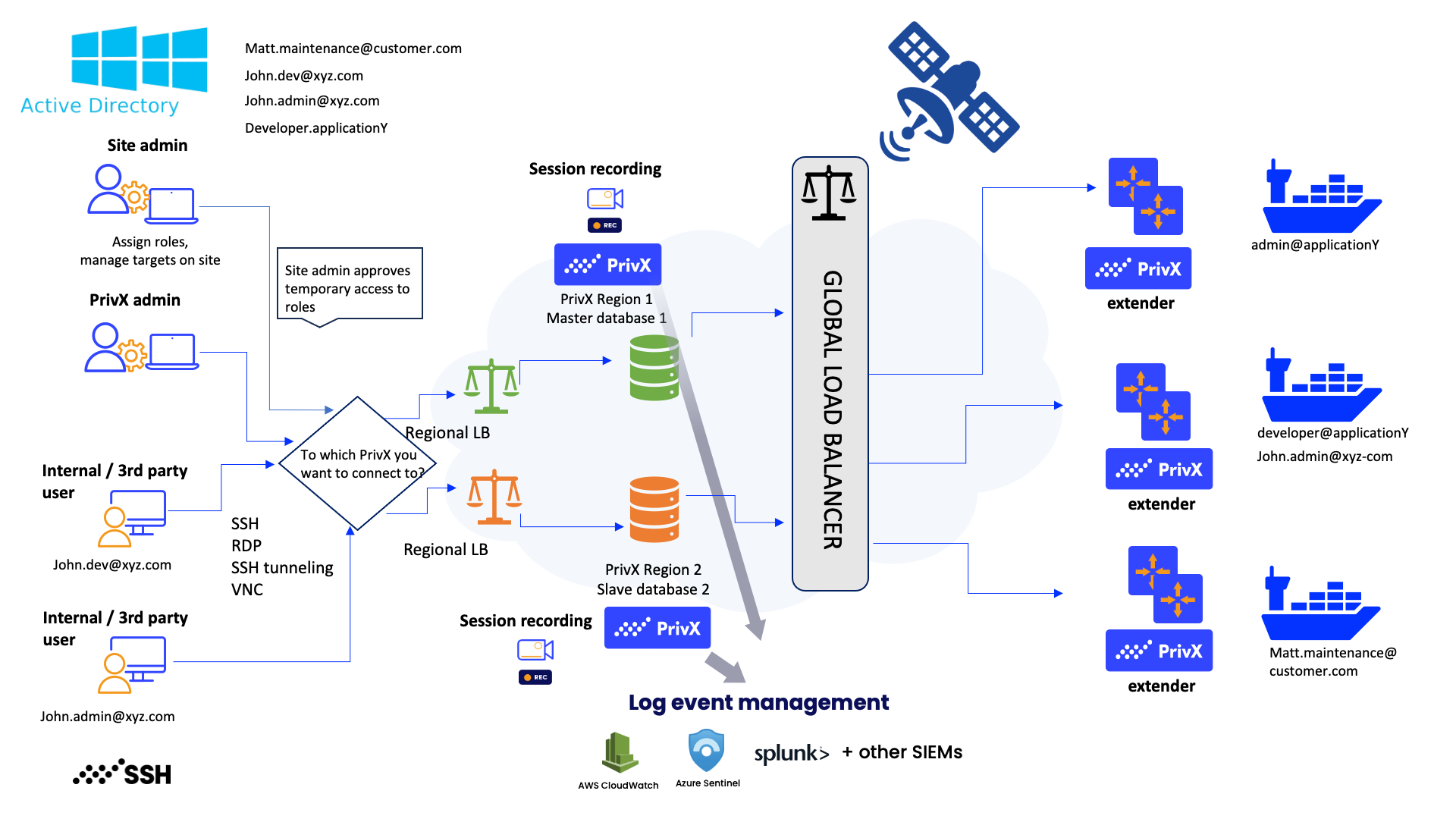
As the customer already had a well-thought-out technical infrastructure where the connections to the ships were made through a combination of the Amazon cloud and a satellite, it was important the deployed solution could fit into the existing infrastructure effortlessly.

PrivX_Maritime_UseCase_Deployment
  1. PrivX was integrated with multiple IAMs and ADs to always link an ID to a role for each session.
  2. PrivX offers multiple authentication methods, including:
    • AD/LDAP user & password
    • Local user & password
    • OpenID Connect
    • MFA (TOTP & Biometric)
    • Passkeys / FIDO2
    • TLS client certificate
    • SSH public key
    • External JSON web token
    • PrivX Authorizer
  3. PrivX stores and rotates the credentials needed for access or enables passwordless access. Credentials are vaulted and rotated after use, or in the case of passwordless access, the user never even sees or handles any credentials.
  4. After authentication, PrivX automatically maps the identity to the right role for access.
  5. The user (maintenance engineer, vendor engineer, ship technician, etc.) only sees a list of available targets based on the role – and nothing else.
  6. The user selects the target from the list and gets access to it. The target can be a single application, sensor, entire server, depending on the task at hand. The actions the user is allowed to perform can be restricted as necessary.
    Using PrivX Extenders, it is possible to connect to hosts without public IP addresses in Virtual Private Cloud (VPC), firewalled private networks or virtual private clouds.
  7. All sessions produce an audit trail. For the most important connections, session recording or live monitoring is available. It also possible to require external authorization by the site admin for critical sessions.
  8. After the session is over, offboarding is automatic. Every session is verified each time it is made, in a just-in-time (JIT) fashion to align with the Zero Trust security framework.

Benefits

icon_globe

Debugging and remote maintenance can be done remotely and securely regardless of the location of the ship or the technician.

Icon

Automated linking of a role to an identity ensuring that all sessions can be verified with strong IDs.

Users-gear

Access is limited by role, meaning that privileges to take actions on the ship are restricted to the minimum to get the job done.

Hourglass

Just-in-time (JIT) access instead of always-on connections to the ships. Each connection to a ship is established at the same time as the authorization and is verified each time it is made – in a true Zero Trust fashion.

Priviledged-access-management (1)

All the secrets (passwords) are managed centrally for risk mitigation.

Secure-file-transfer-1

A centralized access gateway for the entire fleet. Any employee or third party gets access from any location to an individual ship in a uniform, controlled way.

Checklist

All connections are tracked and produce a solid audit trail – with session recordings and live monitoring available.

Cloud

Scalable cloud deployment ensures that the solution can expand as the fleet of ships increases.

Learn more about Secure Remote Access for OT